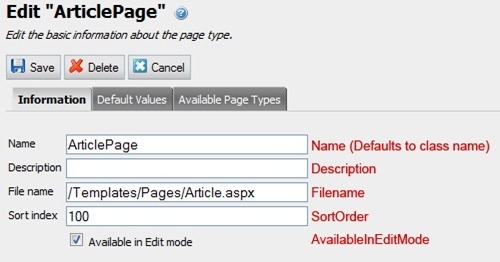
When using Page Type Builder page types are declared in code and a class is equivalent to an EPiServer CMS page type. The criteria for a class being a page type is that it’s a subclass of TypedPageData and that it has a PageType attribute. All of the settings for a page type, except for which properties it has, that is normally done in admin can be done using the PageType attribute’s properties. The name of these properties are usually self-evident but there are a few exceptions. Therefore I thought I’d provide a little visual aid for how the PageTypeAttribute class’ properties map to the settings for a page type in admin mode. The text in red in the images below is the name of the corresponding property in PageTypeAttribute.


I’ll soon post a similar aid for the PageTypePropertyAttribute class.